



ChatGPTと相談しながら、Text Blaze と Tampermonkey で「疑い病名の中止」「確定病名の治癒」を効率化するまで
休日を利用して電子カルテの改修を行いました。電子カルテで病名を整理していると、同じような操作を何度も繰り返す場面があります。
たとえば、
- 疑い病名を中止にする
- 確定病名を治癒にする
- 中止日や転帰日を月末にそろえる
- 複数の病名をまとめて一括編集する
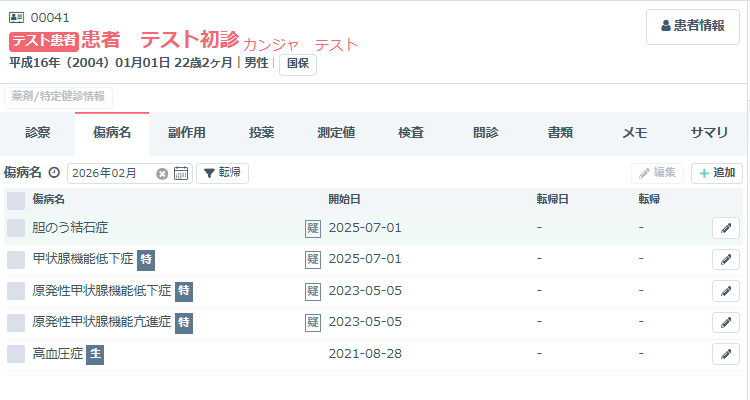
こうした作業は1回1回は単純でも、件数が増えると意外に時間がかかります。今回は、Medley 電子カルテ上でこの作業を少しでも効率化するために、Text Blaze と Tampermonkey を組み合わせて試行錯誤した流れをまとめます。
なお、今回の作業はChatGPTと相談しながら進めており、実際のコードはほぼすべてChatGPTが作成しました。
こちらは「こういう動きにしたい」「この不具合を直したい」と要件を伝え、実際の画面で試しながら修正を重ねていく形でした。
その意味では、単なる自作コードというより、対話しながら業務用の小さなツールを一緒に育てていった感覚に近かったです。
単に「コードを作った」という話ではなく、実際に動かしてみて初めて分かった落とし穴も多かったので、同じようなことを考えている方の参考になればと思います。
まずやりたかったこと
今回やりたかったのは、病名一覧に対して次の2種類の処理です。
1. 疑い病名を中止にする
- 病名に「疑」を含むものを対象
- すでに「中止」になっているものは除外
- 中止日は 先月末 または 今月末
2. 確定病名を治癒にする
- 病名に「疑」を含まないものを対象
- すでに「治癒」「中止」になっているものは除外
- 転帰日は 先月末 または 今月末
つまり、最終的には
- 疑い病名中止(先月末)
- 疑い病名中止(今月末)
- 確定病名治癒(先月末)
- 確定病名治癒(今月末)
の4パターンを、できるだけ少ない操作で実行したい、というのが目標でした。
最初は Text Blaze で対応
最初に使っていたのは Text Blaze です。
Text Blaze は、ブラウザ上の入力補助や定型操作に非常に便利で、電子カルテでもかなり活躍します。
実際に行っていたのは、
- 病名一覧の1行目から20行目までを見る
- 2列目の病名テキストを取得する
- 「疑」が含まれるか判定する
- すでに転帰欄に「中止」があるものを除外する
- 条件に合う行をクリックして選択する
- その後、一括編集画面を開く
という流れでした。
この方法の良いところは、今見えている画面をそのまま対象にできることです。
一方で、少し複雑になるとコードが長くなりやすく、また 日付入力や一括編集の細かい操作になると限界も見えてきました。
Tampermonkey に移した理由
そこで次に試したのが Tampermonkey です。
Tampermonkey を使うと、ブラウザ上の DOM を直接操作できるため、ボタンを画面に出したり、複数ステップを1クリックで実行したりしやすくなります。
今回 Tampermonkey に期待したのは、
- 画面上に専用ボタンを出す
- ボタンを押したら処理を実行する
- 日付を自動入力する
- 一括編集から更新まで一気に進める
ということでした。
ここでも、実際の仕様整理やコードの作成はChatGPTとの対話を通じて進めました。
「右下より左下がいい」「閉じるボタンを付けたい」「再表示できるようにしたい」「横並びにしたい」といった細かなUIの修正も、こちらが要望を伝え、ChatGPTがコードに落とし込む形でかなりスピーディーに進みました。
一括編集の自動化自体はうまくいった
一括編集の流れとしては、
- 一括編集ボタンを押す
outcomeを変更するendDateに日付を入れる- 更新ボタンを押す
という順番です。
ここで重要だったのが、outcome が見た目はプルダウンでも、
実際には どう変更すると画面側が正しく反応するか でした。
最初は ArrowDown を送る方式も試しましたが、これは環境によって不安定でした。
最終的には、select の selectedIndex を直接変更して、input / change / blur を発火させる形が比較的安定しました。
日付についても、単に value を書き換えるだけでは反応しないことがあるため、
ネイティブ setter を通して値を入れた上でイベントを飛ばすのがポイントでした。
「先月末」「今月末」を自動計算する
日付は毎回手で入れるより、月末を自動計算した方が実用的です。
たとえば、
- 先月末
new Date(今年, 今月, 0) - 今月末
new Date(今年, 今月 + 1, 0)
という考え方を使うと、月末日を簡単に求められます。
2月やうるう年も自動で正しく処理されるので便利です。
4ボタン化で使い勝手が上がった
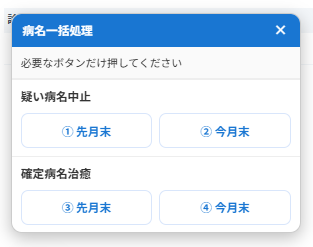
最終的には、画面上に4つのボタンを用意する方向にしました。
疑い病名中止
- ① 先月末
- ② 今月末
確定病名治癒
- ③ 先月末
- ④ 今月末
これにより、その場で目的に応じて押し分けるだけになり、かなり使いやすくなりました。
また、途中で
- 右下表示
- 左下表示
- 下から100px
- ドラッグ可能
- ×で閉じる
- 再表示ボタンを残す
といった UI 面の調整も行い、実際の運用に合わせて少しずつ改善しました。
ただし、ここで大きな問題が起きた
ここからが、実際にやってみて分かった重要な部分です。
病名選択を自動化していく中で、「疑」の表示が崩れるという問題が起きました。
本来は「疑」とだけ表示されていたものが、なぜか「疑い」と表示されるようになり、見た目が縦に崩れてしまいました。
さらに、それだけでなく、他のページにも影響が出る場面がありました。
たとえば採血結果画面で、異常値を示す表示が崩れるような現象も見られました。
これはかなり大事なポイントで、
「目的の画面だけを触っているつもりでも、広いセレクタや常時監視が別ページのUIに副作用を及ぼすことがある」ということです。
原因として考えられたこと
今回の経験から、問題の原因として強く疑われたのは次の点です。
1. セレクタが広すぎる
たとえば .css-kp29zf のような自動生成クラスは、
別の部品でも同じクラス名が使われている可能性があります。
そのため、行選択のつもりでクリックしていたものが、実際には
- 「疑」
- 「主病」
- その他のUI部品
を触ってしまっていた可能性があります。
2. @match が広すぎる
https://karte.medley.life/* 全体にスクリプトを適用していると、
傷病名画面以外でもスクリプトが生きてしまいます。
3. DOM 監視の影響
MutationObserver で全体を見続ける構成は便利ですが、
ページによっては思わぬ再描画や副作用の原因になります。
結論:安定版を土台にして、変更は最小限にするのが大切
この試行錯誤の中で分かったのは、
一度安定して動いていた版を土台にして、見た目や補助機能だけを少しずつ足していくのが一番安全だということです。
機能を一気に増やすと、
- どこで壊れたのか分からなくなる
- UI の崩れと処理ロジックの不具合が混ざる
- 原因追跡が難しくなる
という問題が起きやすくなります。
特に電子カルテのような業務画面では、
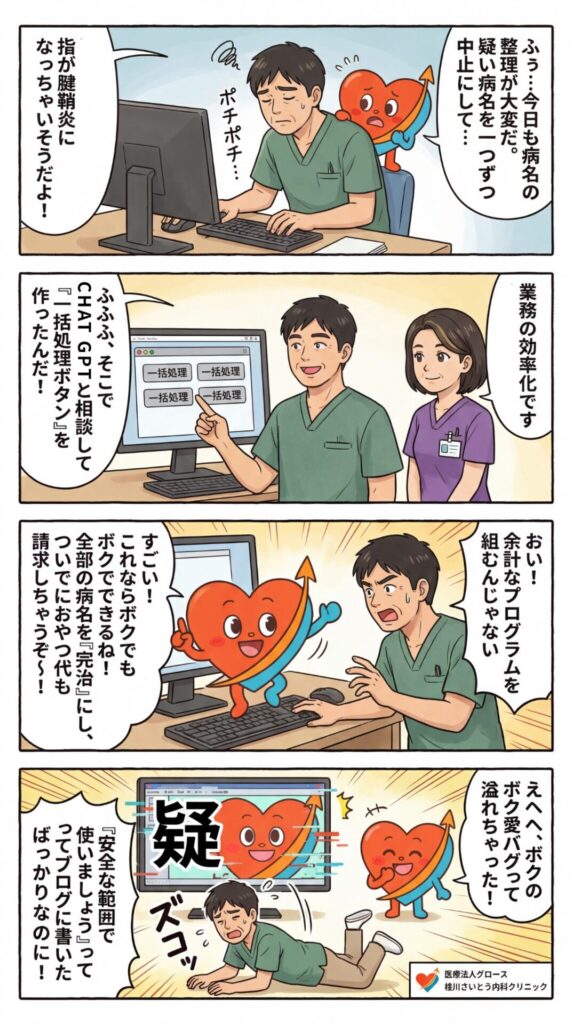
「便利そうだから全部自動化する」より、「安全に動く範囲だけを自動化する」方が現実的です。
今回の学び
今回の試行錯誤で特に学んだことは次の通りです。
1. まずは単機能で安定版を作る
いきなり多機能にせず、
- 一括編集を開く
- outcome を変更する
- endDate を入れる
- 更新する
という最小単位で確実に動く版を作る方がよいです。
2. セレクタはなるべく限定する
自動生成クラスに頼りすぎると壊れやすいです。
できるだけ
idnamedata-testid- 親子関係が明確なセレクタ
を優先した方が安全です。
3. 全ページ適用は副作用を生みやすい
便利さのために全ページで動かすと、思わぬページに影響します。
病名ページだけなど、できるだけ範囲を絞る意識が重要です。
4. UIの改善は最後
ボタンの色や位置、再表示機能などは使い勝手に大切ですが、
まずは本体処理が安定してからの方がトラブルが少ないです。
5. ChatGPTは「コード生成」だけでなく「試行錯誤の相棒」になる
今回あらためて感じたのは、ChatGPTは単にコードを書くだけでなく、
- 要件整理
- 原因の切り分け
- 修正方針の提案
- UI改善の相談
- 段階的な試作
まで一緒に進められる点です。
特に今回のように、実際の画面で「ここが崩れた」「ここはうまく動いた」とフィードバックを返しながら改善していく作業では、かなり相性が良いと感じました。
まとめ
電子カルテの病名整理は、単純に見えて意外と手間がかかります。
Text Blaze や Tampermonkey を使うことで、その一部はかなり効率化できます。
今回の試みでは、
- 疑い病名を中止
- 確定病名を治癒
- 先月末・今月末を自動入力
- 4ボタン化で押し分け
- 閉じる・再表示などのUI改善
といったところまで進めることができました。電子カルテの画面上に下記のようなボタンが新しく表示されるようになりました。
こうした経験から感じるのは、
電子カルテ自動化は「できるかどうか」より、「安全に限定して使えるかどうか」が大事だということです。
便利さを追うほど副作用も増えやすいので、
まずは小さく作って、少しずつ広げていくのが現実的だと思います。
そして今回のように、ChatGPTと相談しながら実際のコードをほぼ作ってもらい、こちらは要件整理と動作確認に集中するやり方は、業務改善のスピードをかなり上げてくれると感じました。
うまく使えば、専門的なプログラミング知識がなくても、現場に合った小さな自動化ツールを作っていくことは十分可能です。当初は Claude in Chrome のようなAIツールに画面操作を担わせる方法も考えました。
ただ、実際の運用を考えると、決まった条件で処理する作業であれば、AIに逐一判断させるよりも、あらかじめ条件を定めたアルゴリズムで処理した方が動作は速く、安定しやすいと感じました。
また、電子カルテのように個人情報を扱う環境では、AIに画面操作そのものを委ねることについて、セキュリティや個人情報保護の観点から慎重であるべきだと思います。
そのため今回は、AIに直接カルテを操作させるのではなく、要件整理やコード作成の支援にはAIを活用しつつ、実際の処理は Text Blaze や Tampermonkey による明示的なアルゴリズムで実装するという形を選びました。
実際のコードは下記になります。クリニクスカルテの方はコピペで利用できます。
// ==UserScript==
// @name         Medley disease bulk updater (4 buttons + hide/restore + 2 rows fixed)
// @namespace    http://tampermonkey.net/
// @version      2.4
// @description  疑い病名を中止、確定病名を治癒。先月末/今月末を選べる4ボタン。左下表示、閉じる・再表示対応。
// @match        https://karte.medley.life/*
// @grant        none
// ==/UserScript==

(function () {
  'use strict';

  const MAX_ROWS = 20;
  const WIDGET_ID = 'tm-medley-disease-widget';
  const RESTORE_ID = 'tm-medley-disease-restore';
  const HIDE_KEY = 'tm_medley_disease_widget_hidden_v24';

  function sleep(ms) {
    return new Promise(resolve => setTimeout(resolve, ms));
  }

  async function waitForElement(selectors, timeout = 4000, interval = 100) {
    const list = Array.isArray(selectors) ? selectors : [selectors];
    const start = Date.now();

    while (Date.now() - start < timeout) {
      for (const selector of list) {
        const el = document.querySelector(selector);
        if (el) return el;
      }
      await sleep(interval);
    }

    throw new Error(`要素が見つかりません: ${list.join(' / ')}`);
  }

  function queryOptional(selector) {
    return document.querySelector(selector);
  }

  function getText(selector) {
    const el = queryOptional(selector);
    return el ? (el.textContent || '').trim() : '';
  }

  function clickElement(el) {
    if (!el) return false;

    el.scrollIntoView({ block: 'center', inline: 'center' });
    el.dispatchEvent(new MouseEvent('mousedown', { bubbles: true, cancelable: true }));
    el.dispatchEvent(new MouseEvent('mouseup', { bubbles: true, cancelable: true }));
    el.dispatchEvent(new MouseEvent('click', { bubbles: true, cancelable: true }));
    return true;
  }

  function setNativeValue(element, value) {
    const valueSetter = Object.getOwnPropertyDescriptor(element, 'value')?.set;
    const prototype = Object.getPrototypeOf(element);
    const prototypeValueSetter = Object.getOwnPropertyDescriptor(prototype, 'value')?.set;

    if (prototypeValueSetter && valueSetter !== prototypeValueSetter) {
      prototypeValueSetter.call(element, value);
    } else if (valueSetter) {
      valueSetter.call(element, value);
    } else {
      element.value = value;
    }
  }

  function fireValueEvents(el) {
    el.dispatchEvent(new Event('input', { bubbles: true }));
    el.dispatchEvent(new Event('change', { bubbles: true }));
    el.dispatchEvent(new Event('blur', { bubbles: true }));
  }

  function formatDate(date) {
    const yyyy = date.getFullYear();
    const mm = String(date.getMonth() + 1).padStart(2, '0');
    const dd = String(date.getDate()).padStart(2, '0');
    return `${yyyy}-${mm}-${dd}`;
  }

  function getLastMonthEndString() {
    const today = new Date();
    return formatDate(new Date(today.getFullYear(), today.getMonth(), 0));
  }

  function getThisMonthEndString() {
    const today = new Date();
    return formatDate(new Date(today.getFullYear(), today.getMonth() + 1, 0));
  }

  function getDiseaseText(rowIndex) {
    return getText(`tbody > :nth-child(${rowIndex}) > :nth-child(2)`);
  }

  function getOutcomeText(rowIndex) {
    return getText(`.css-1f7ju3d tbody > :nth-child(${rowIndex}) > :nth-child(5)`);
  }

  function getRowCheckbox(rowIndex) {
    return queryOptional(`tbody > :nth-child(${rowIndex}) .css-kp29zf`);
  }

  function getRowElement(rowIndex) {
    return queryOptional(`tbody > :nth-child(${rowIndex})`);
  }

  function isRowSelected(rowIndex) {
    const row = getRowElement(rowIndex);
    if (!row) return false;

    const checkbox = row.querySelector('input[type="checkbox"]');
    if (checkbox) return !!checkbox.checked;

    const checkedNode = row.querySelector('[aria-checked="true"]');
    if (checkedNode) return true;

    if (row.getAttribute('aria-selected') === 'true') return true;

    return false;
  }

  function setRowSelected(rowIndex, desired) {
    const row = getRowElement(rowIndex);
    const target = getRowCheckbox(rowIndex);
    if (!row || !target) return false;

    const current = isRowSelected(rowIndex);
    if (current === desired) return false;

    clickElement(target);
    return true;
  }

  function clearSelections() {
    for (let i = 1; i <= MAX_ROWS; i += 1) {
      setRowSelected(i, false);
    }
  }

  function selectRowsByPredicate(predicate) {
    const selectedIndexes = [];

    for (let i = 1; i <= MAX_ROWS; i += 1) {
      const diseaseText = getDiseaseText(i);
      const outcomeText = getOutcomeText(i);

      if (!diseaseText) continue;

      if (predicate({ rowIndex: i, diseaseText, outcomeText })) {
        setRowSelected(i, true);
        selectedIndexes.push(i);
      }
    }

    return selectedIndexes;
  }

  function setOutcomeByIndexOffset(selectEl, offset) {
    if (!selectEl) {
      throw new Error('outcome が見つかりません');
    }

    if (typeof selectEl.selectedIndex !== 'number' || !selectEl.options) {
      throw new Error('outcome は select として扱えません');
    }

    const currentIndex = selectEl.selectedIndex;
    const newIndex = currentIndex + offset;

    if (newIndex < 0 || newIndex >= selectEl.options.length) {
      throw new Error(
        `outcome の候補範囲外です。currentIndex=${currentIndex}, newIndex=${newIndex}, options=${selectEl.options.length}`
      );
    }

    selectEl.focus();
    selectEl.selectedIndex = newIndex;
    setNativeValue(selectEl, selectEl.value);
    fireValueEvents(selectEl);
  }

  function setEndDate(value) {
    const endDate =
      queryOptional('#endDate') ||
      queryOptional('[data-testid="endDate"]') ||
      queryOptional('input[name="endDate"]');

    if (!endDate) {
      throw new Error('endDate が見つかりません');
    }

    endDate.focus();
    setNativeValue(endDate, value);
    fireValueEvents(endDate);
  }

  function clickUpdateButton() {
    const updateButton =
      queryOptional('button[form="orcaPatientDiseaseFormId"]') ||
      Array.from(document.querySelectorAll('button')).find(
        btn => (btn.textContent || '').trim() === '更新'
      );

    if (!updateButton) {
      throw new Error('更新ボタンが見つかりません');
    }

    if (updateButton.disabled) {
      throw new Error('更新ボタンが無効化されています');
    }

    clickElement(updateButton);
  }

  async function bulkEditSelectedRows(outcomeOffset, dateString) {
    const bulkEditButton = await waitForElement('[data-testid="disease-bulk-edit-button"]');
    clickElement(bulkEditButton);

    const outcome = await waitForElement(['#outcome', 'select#outcome']);
    setOutcomeByIndexOffset(outcome, outcomeOffset);

    await waitForElement(['#endDate', '[data-testid="endDate"]', 'input[name="endDate"]']);
    setEndDate(dateString);

    await sleep(150);
    clickUpdateButton();
    await sleep(500);
  }

  async function runSuspectedToStopped(dateString) {
    clearSelections();

    const selected = selectRowsByPredicate(({ diseaseText, outcomeText }) => {
      return diseaseText.includes('疑') && !outcomeText.includes('中止');
    });

    if (selected.length === 0) {
      alert('中止対象の疑い病名がありません');
      return;
    }

    await bulkEditSelectedRows(3, dateString);
  }

  async function runConfirmedToHealed(dateString) {
    clearSelections();

    const selected = selectRowsByPredicate(({ diseaseText, outcomeText }) => {
      return (
        !diseaseText.includes('疑') &&
        !outcomeText.includes('治癒') &&
        !outcomeText.includes('中止')
      );
    });

    if (selected.length === 0) {
      alert('治癒対象の確定病名がありません');
      return;
    }

    await bulkEditSelectedRows(1, dateString);
  }

  function makeDraggable(handle, target) {
    let isDragging = false;
    let offsetX = 0;
    let offsetY = 0;

    handle.addEventListener('mousedown', (e) => {
      if (e.target.closest('.tm-close-btn')) return;

      isDragging = true;
      const rect = target.getBoundingClientRect();
      offsetX = e.clientX - rect.left;
      offsetY = e.clientY - rect.top;
      target.style.right = 'auto';
      target.style.bottom = 'auto';
      e.preventDefault();
    });

    document.addEventListener('mousemove', (e) => {
      if (!isDragging) return;
      target.style.left = `${e.clientX - offsetX}px`;
      target.style.top = `${e.clientY - offsetY}px`;
    });

    document.addEventListener('mouseup', () => {
      isDragging = false;
    });
  }

  function createActionButton(label, onClick) {
    const btn = document.createElement('button');
    btn.type = 'button';
    btn.textContent = label;

    Object.assign(btn.style, {
      display: 'block',
      flex: '1 1 0',
      width: 'auto',
      minWidth: '0',
      padding: '8px 10px',
      background: '#fff',
      color: '#1976d2',
      border: '1px solid #d9e6fb',
      borderRadius: '8px',
      fontSize: '13px',
      fontWeight: 'bold',
      cursor: 'pointer',
      textAlign: 'center',
      boxSizing: 'border-box',
      whiteSpace: 'nowrap'
    });

    btn.addEventListener('mouseover', () => {
      btn.style.background = '#f5f9ff';
    });

    btn.addEventListener('mouseout', () => {
      btn.style.background = '#fff';
    });

    btn.addEventListener('click', async () => {
      const original = btn.textContent;
      btn.disabled = true;
      btn.textContent = '実行中...';

      try {
        await onClick();
        btn.textContent = '完了';
      } catch (e) {
        console.error(e);
        alert(`処理に失敗しました: ${e.message}`);
        btn.textContent = '失敗';
      }

      setTimeout(() => {
        btn.textContent = original;
        btn.disabled = false;
      }, 1000);
    });

    return btn;
  }

  function createSection(titleText, button1, button2) {
    const section = document.createElement('div');
    Object.assign(section.style, {
      padding: '8px 10px',
      borderTop: '1px solid #eee'
    });

    const title = document.createElement('div');
    title.textContent = titleText;
    Object.assign(title.style, {
      fontSize: '13px',
      fontWeight: 'bold',
      color: '#333',
      marginBottom: '8px'
    });

    const row = document.createElement('div');
    Object.assign(row.style, {
      display: 'flex',
      flexDirection: 'row',
      gap: '8px',
      alignItems: 'stretch'
    });

    row.appendChild(button1);
    row.appendChild(button2);

    section.appendChild(title);
    section.appendChild(row);

    return section;
  }

  function isHidden() {
    return sessionStorage.getItem(HIDE_KEY) === '1';
  }

  function hideWidget() {
    sessionStorage.setItem(HIDE_KEY, '1');
    const widget = document.getElementById(WIDGET_ID);
    if (widget) widget.remove();
    ensureRestoreButton();
  }

  function showWidget() {
    sessionStorage.removeItem(HIDE_KEY);
    const restore = document.getElementById(RESTORE_ID);
    if (restore) restore.remove();
    ensureWidget();
  }

  function ensureRestoreButton() {
    if (!isHidden()) {
      const old = document.getElementById(RESTORE_ID);
      if (old) old.remove();
      return;
    }

    if (document.getElementById(RESTORE_ID)) return;

    const btn = document.createElement('button');
    btn.id = RESTORE_ID;
    btn.type = 'button';
    btn.textContent = '再表示';

    Object.assign(btn.style, {
      position: 'fixed',
      left: '12px',
      bottom: '100px',
      zIndex: '999999',
      padding: '8px 12px',
      background: '#1976d2',
      color: '#ffffff',
      border: '1px solid #1565c0',
      borderRadius: '6px',
      fontSize: '12px',
      fontWeight: 'bold',
      cursor: 'pointer',
      boxShadow: '0 3px 8px rgba(0,0,0,0.18)'
    });

    btn.addEventListener('mouseover', () => {
      btn.style.background = '#1565c0';
    });

    btn.addEventListener('mouseout', () => {
      btn.style.background = '#1976d2';
    });

    btn.addEventListener('click', showWidget);

    document.body.appendChild(btn);
  }

  function ensureWidget() {
    if (isHidden()) {
      ensureRestoreButton();
      return;
    }

    const restore = document.getElementById(RESTORE_ID);
    if (restore) restore.remove();

    if (document.getElementById(WIDGET_ID)) return;

    const wrap = document.createElement('div');
    wrap.id = WIDGET_ID;

    Object.assign(wrap.style, {
      position: 'fixed',
      left: '12px',
      bottom: '100px',
      zIndex: '999999',
      background: '#ffffff',
      border: '1px solid #ccc',
      borderRadius: '12px',
      boxShadow: '0 6px 18px rgba(0,0,0,0.25)',
      overflow: 'hidden',
      minWidth: '320px',
      fontFamily: 'sans-serif'
    });

    const header = document.createElement('div');
    Object.assign(header.style, {
      background: '#1976d2',
      color: '#fff',
      padding: '8px 12px',
      fontSize: '13px',
      fontWeight: 'bold',
      cursor: 'move',
      userSelect: 'none',
      display: 'flex',
      alignItems: 'center',
      justifyContent: 'space-between',
      gap: '8px'
    });

    const title = document.createElement('span');
    title.textContent = '病名一括処理';

    const closeBtn = document.createElement('button');
    closeBtn.type = 'button';
    closeBtn.className = 'tm-close-btn';
    closeBtn.textContent = '×';
    Object.assign(closeBtn.style, {
      background: 'transparent',
      color: '#ffffff',
      border: 'none',
      fontSize: '15px',
      fontWeight: 'bold',
      lineHeight: '1',
      cursor: 'pointer',
      padding: '0 2px',
      margin: '0'
    });
    closeBtn.addEventListener('click', hideWidget);

    header.appendChild(title);
    header.appendChild(closeBtn);

    const note = document.createElement('div');
    note.textContent = '必要なボタンだけ押してください';
    Object.assign(note.style, {
      padding: '8px 10px',
      fontSize: '12px',
      background: '#fafafa',
      borderBottom: '1px solid #eee',
      color: '#333'
    });

    const suspectedLast = createActionButton('① 先月末', () => {
      return runSuspectedToStopped(getLastMonthEndString());
    });

    const suspectedThis = createActionButton('② 今月末', () => {
      return runSuspectedToStopped(getThisMonthEndString());
    });

    const confirmedLast = createActionButton('③ 先月末', () => {
      return runConfirmedToHealed(getLastMonthEndString());
    });

    const confirmedThis = createActionButton('④ 今月末', () => {
      return runConfirmedToHealed(getThisMonthEndString());
    });

    const section1 = createSection('疑い病名中止', suspectedLast, suspectedThis);
    const section2 = createSection('確定病名治癒', confirmedLast, confirmedThis);

    wrap.appendChild(header);
    wrap.appendChild(note);
    wrap.appendChild(section1);
    wrap.appendChild(section2);

    document.body.appendChild(wrap);
    makeDraggable(header, wrap);
  }

  const observer = new MutationObserver(() => {
    ensureWidget();
    ensureRestoreButton();
  });

  function startObserver() {
    const target = document.body || document.documentElement;
    if (!target) return;

    observer.observe(target, {
      childList: true,
      subtree: true
    });
  }

  if (document.readyState === 'loading') {
    document.addEventListener('DOMContentLoaded', () => {
      ensureWidget();
      ensureRestoreButton();
      startObserver();
    });
  } else {
    ensureWidget();
    ensureRestoreButton();
    startObserver();
  }
})();
コメント